How I Deploy n8n to Hetzner Cloud with OpenTofu
I wanted to deploy n8n to Hetzner Cloud with OpenTofu with proper security, SSL certificates, and infrastructure-as-code. The manual process was eating hours of my time. Spinning up a new self-hosted n8n instance used to take me about an hour of clicking through interfaces and running commands. Now I do it in under 5 minutes…
I wanted to deploy n8n to Hetzner Cloud with OpenTofu with proper security, SSL certificates, and infrastructure-as-code. The manual process was eating hours of my time. Spinning up a new self-hosted n8n instance used to take me about an hour of clicking through interfaces and running commands.
Now I do it in under 5 minutes with 3 OpenTofu commands.
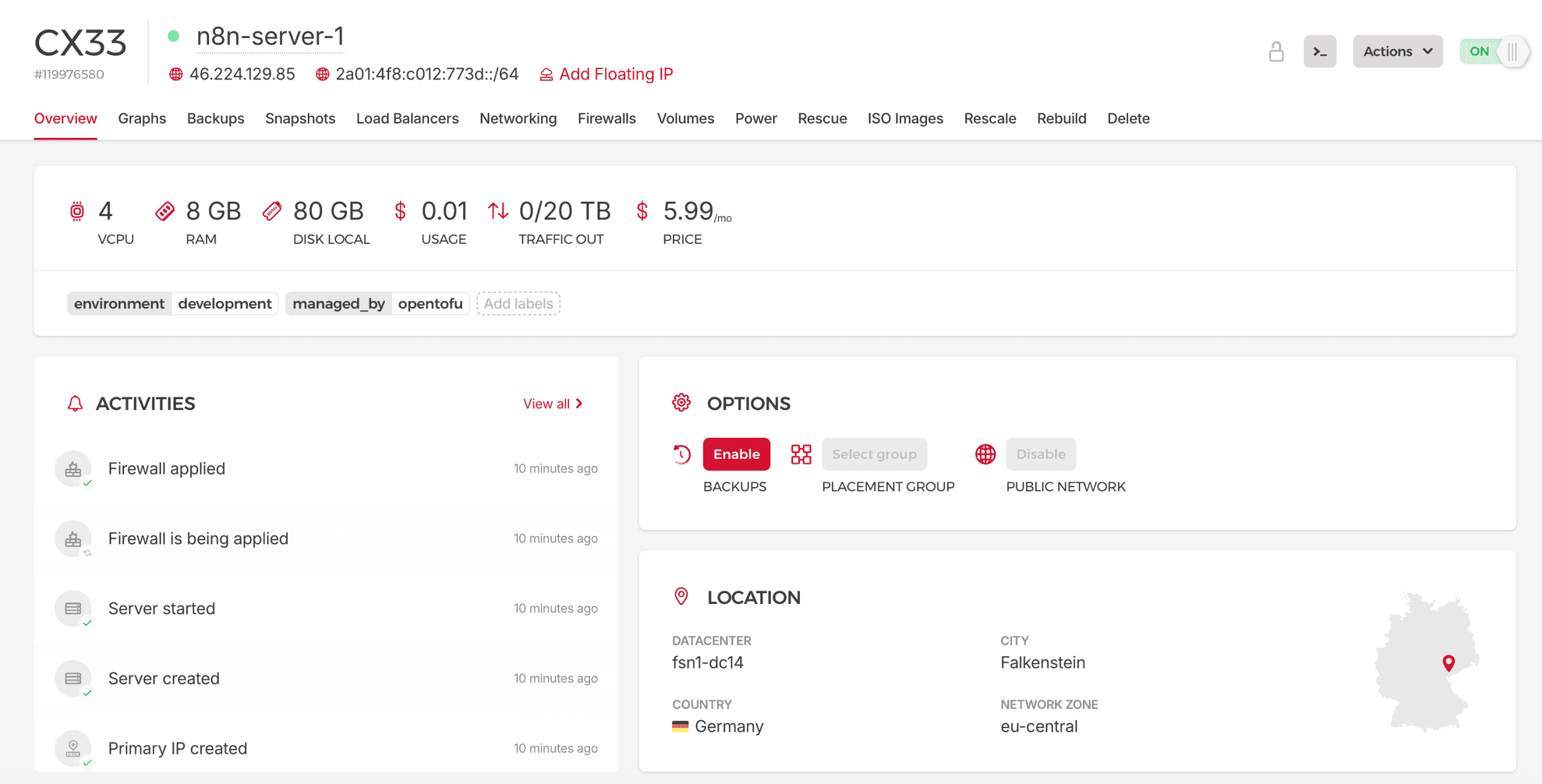
Here’s how I built this system.
Manual Server Setup Took Me an Hour
Docker Compose handles the application stack. But before you can run docker compose up, you need a server.
Before automation, that meant:
- Log into Hetzner Cloud console, create server, configure SSH key
- SSH in and update packages
- Install Docker and Docker Compose
- Configure firewall rules
- Install and configure fail2ban
- Harden SSH (disable root, password auth, set max attempts)
- Clone your Docker Compose repository
- Create environment files and generate secure passwords
That’s about an hour of setup before Docker Compose even runs. Miss one security setting and you’re vulnerable. Forget to generate a strong password and you’ve got a weak point. I found myself putting off new deployments because the overhead just wasn’t worth it.
A Three-Command Deployment
Now my workflow is:
tofu init      # Initialize OpenTofu
tofu plan      # Preview what will be created
tofu apply     # Deploy everything
Everything else happens automatically: server provisioning, Docker installation, security hardening, SSL certificates, secret generation, container deployment. I still configure my domain’s DNS records manually, but even that takes 30 seconds.
The system handles multiple services too. To add BaseRow, NocoDB or MinIO alongside n8n, you flip a toggle in your config file and redeploy.
The complete OpenTofu configuration and Docker stack, templates and scripts, live in my Build-Automate community. More on that at the end.
System Architecture
Here’s how the pieces fit together:
Infrastructure Layer: Hetzner Cloud
The foundation is Hetzner’s affordable cloud platform:
- Server runs Ubuntu 24.04 with Docker pre-installed
- Firewall restricts SSH to your IP, opens HTTP/HTTPS to the world
- SSH Key uploaded automatically for secure access
- Backups optional automatic snapshots
Configuration Layer: OpenTofu
OpenTofu (the open-source Terraform fork) manages everything:
- main.tf defines server, firewall, and provisioning logic
- variables.tf holds all configurable options
- cloud-init.yaml initializes the server on first boot
- terraform.tfvars stores your specific configuration
Service Layer: Docker Compose
The actual applications run in containers:
- n8n with PostgreSQL database
- Traefik reverse proxy with automatic SSL
- Optional services like BaseRow, NocoDB, MinIO
- All configured via environment files with auto-generated secrets
Breaking Down the Components
1. OpenTofu as My Infrastructure Manager
I use OpenTofu because it’s the open-source fork of Terraform with no licensing concerns. The configuration is declarative. I describe what I want, and OpenTofu figures out how to make it happen.
My project has 6 key files that work together:
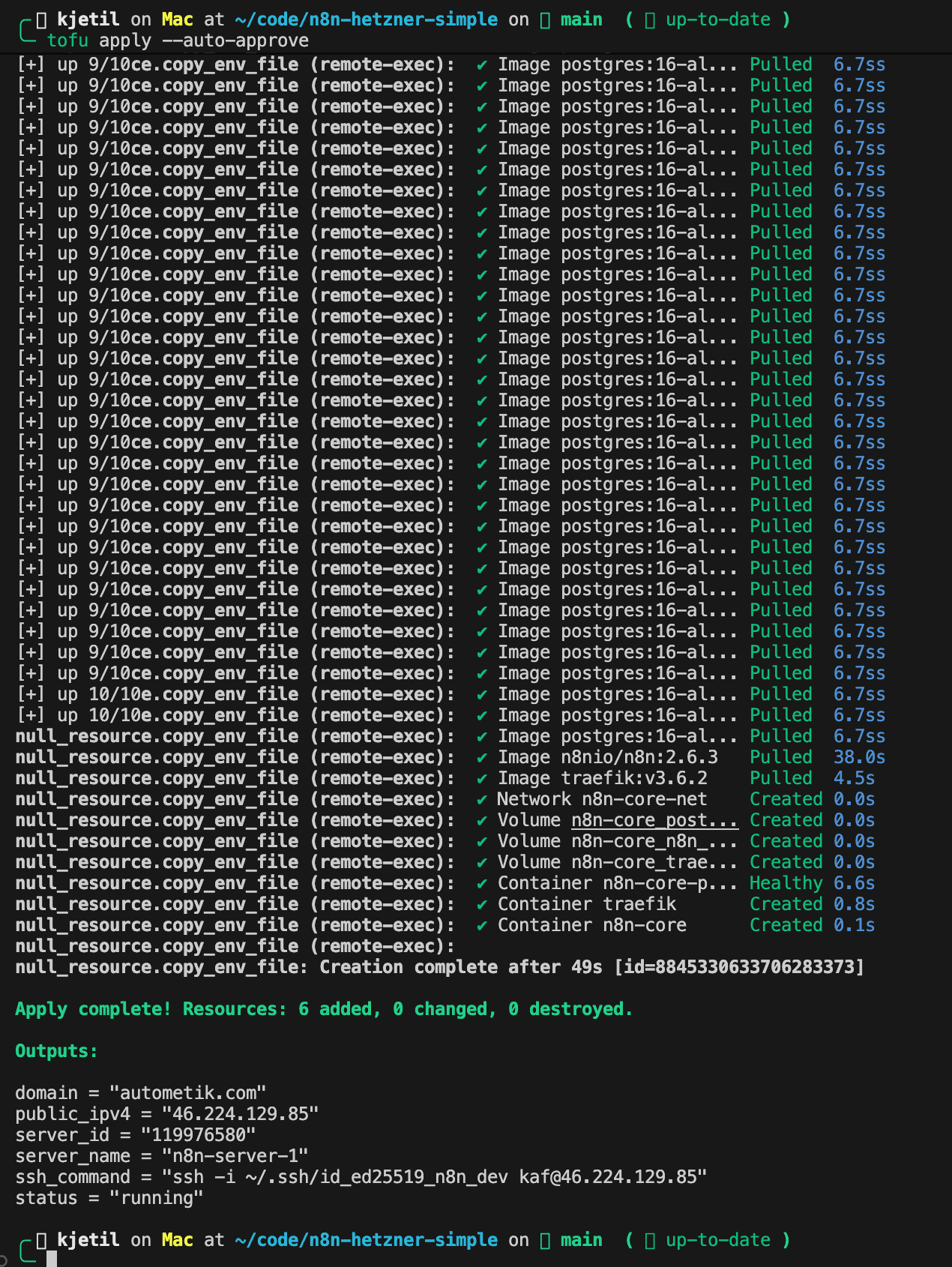
The architecture follows a cloud-init + provisioner model. When you run tofu apply:
- OpenTofu creates the server, firewall, and uploads your SSH key
- Cloud-init runs on first boot: installs Docker, security tools, clones your service repository
- Provisioners execute after the server is ready: wait for DNS, generate secrets, start containers
The tricky part was getting the timing right. Cloud-init runs asynchronously, so the provisioners need to wait for it to complete before doing anything. The script polls until Docker is running and the repo is cloned.
The service toggle system is what makes this flexible. In your config file, you define which services you want:
services = {
  baserow = {
    enabled = true
    secrets = ["SECRET_KEY", "DATABASE_PASSWORD"]
  }
  nocodb = {
    enabled = false
    secrets = ["NC_AUTH_JWT_SECRET"]
  }
}
Run tofu apply and only the enabled services deploy. Change a toggle and re-run. The system adds or removes services without touching the others.
The actual implementation involves some clever sed manipulation and Docker Compose includes that I’ll share in the full walkthrough below.
2. Security Hardening (Automatic)
Most tutorials skip security or add it as an afterthought. This system includes it by default.
SSH Hardening:
- Root login disabled
- Password authentication disabled (key-only)
- Maximum 2 authentication attempts
- Only your configured user can SSH in
Network Security:
- SSH restricted to your home IP address
- HTTP/HTTPS open for web traffic
- fail2ban monitors for brute-force attempts
- Hetzner Cloud firewall as first line of defense
Secret Management:
- Passwords auto-generated on the server (never stored in Terraform state)
- Special characters stripped for database compatibility
- Each service gets unique credentials
- Existing secrets preserved on re-deploys
The secret management approach took some iteration to get right. The naive approach, generating secrets in Terraform, means they end up in your state file. Not ideal. I use a provisioner-based approach that generates secrets on the server itself, so they never touch your local machine. More on this in the Service Configuration section below.
The exact sshd_config settings and fail2ban configuration are in the complete implementation.
3. SSL Certificates (Zero Configuration)
Traefik handles SSL automatically:
# From docker-compose.yml
traefik:
  image: traefik:v3.6.2
  command:
    - "--providers.docker=true"
    - "--providers.docker.exposedbydefault=false"
    - "--entrypoints.web.address=:80"
    - "--entrypoints.websecure.address=:443"
    - "--certificatesresolvers.le.acme.tlschallenge=true"
    - "--certificatesresolvers.le.acme.email=${ACME_EMAIL}"
    - "--certificatesresolvers.le.acme.storage=/letsencrypt/acme.json"
  ports:
    - "80:80"
    - "443:443"
  volumes:
    - traefik_data:/letsencrypt
    - /var/run/docker.sock:/var/run/docker.sock:ro
When a new service starts, Traefik:
- Detects the container’s domain label
- Requests a certificate from Let’s Encrypt via TLS challenge
- Routes HTTPS traffic to the correct container
- Renews certificates before they expire
So there is no certbot cron job to set up.
4. Service Configuration
Services are controlled through Docker Compose with a modular include system:
# docker-compose.yml
include:
  - docker-compose.baserow.yml
#  - docker-compose.nocodb.yml    # Disabled
  - docker-compose.minio.yml
The configure script reads your service settings (passed as JSON) and toggles each service:
# From configure-services.sh - service toggling
echo "$SERVICES_JSON" | jq -r 'to_entries[] | "\\(.key) \\(.value.enabled)"' | while read name enabled; do
  if [ "$enabled" = "true" ]; then
    sed -i "s|^#  - docker-compose.${name}.yml|  - docker-compose.${name}.yml|" docker-compose.yml
  else
    sed -i "s|^  - docker-compose.${name}.yml|#  - docker-compose.${name}.yml|" docker-compose.yml
  fi
done
The sed patterns handle commenting/uncommenting the include lines. The tricky part was matching both states (commented and uncommented) without breaking YAML syntax.
For secrets, each service defines which environment variables it needs. The script generates them all upfront:
# From configure-services.sh - secret generation
sed -i "s|N8N_ENCRYPTION_KEY=.*|N8N_ENCRYPTION_KEY=$(openssl rand -base64 24 | tr -d '/+=')|g" .env
sed -i "s|POSTGRES_PASSWORD=.*|POSTGRES_PASSWORD=$(openssl rand -base64 24 | tr -d '/+=')|g" .env

# Generate all service-specific secrets
echo "$SERVICES_JSON" | jq -r '.[] | .secrets[] | @text' | sort -u | while read secret; do
  sed -i "s|${secret}=.*|${secret}=$(openssl rand -base64 24 | tr -d '/+=')|g" .env
done
The tr -d '/+=' strips special characters that break some databases. Secrets are generated on the server, never stored in Terraform state.
The full script also handles .env file creation, preserving existing secrets on re-runs, and copying service-specific environment files.
5. DNS Verification
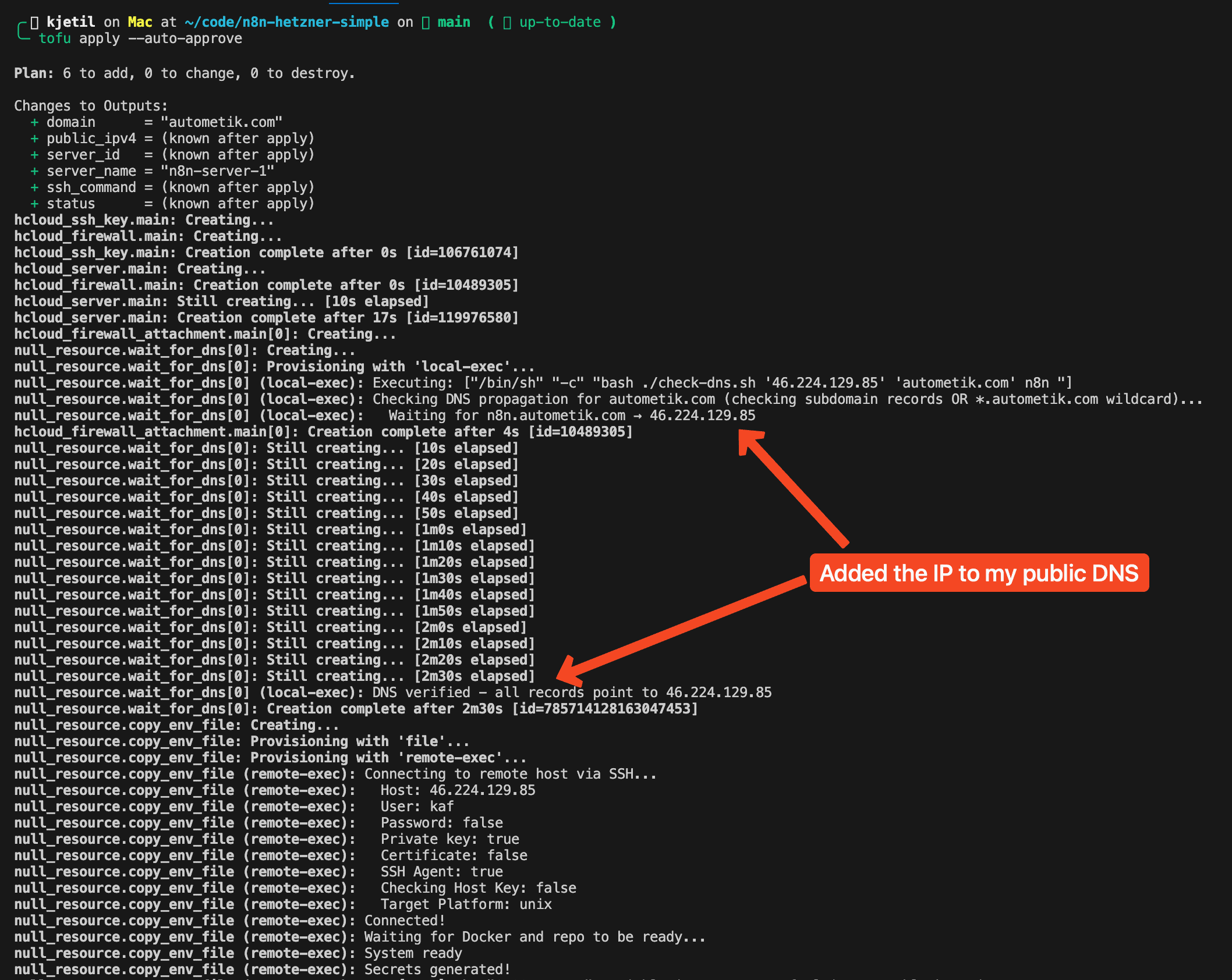
Here’s a problem that bit me early on: Traefik tries to get SSL certificates immediately when containers start. If DNS hasn’t propagated yet, Let’s Encrypt validation fails. Worse, you get rate-limited and have to wait an hour before trying again.
The solution is a DNS verification script that runs before starting any containers:
# From check-dns.sh
MAX_ATTEMPTS=60
ATTEMPT=0

while [ $ATTEMPT -lt $MAX_ATTEMPTS ]; do
  ALL_RESOLVED=true

  for service in "${SERVICES[@]}"; do
    FQDN="$service.$DOMAIN"
    RESOLVED_IP=$(dig +short "$FQDN" @1.1.1.1 2>/dev/null | head -n1)

    if [ "$RESOLVED_IP" != "$SERVER_IP" ]; then
      ALL_RESOLVED=false
    fi
  done

  if [ "$ALL_RESOLVED" = true ]; then
    echo "DNS verified - all records point to $SERVER_IP"
    exit 0
  fi

  ATTEMPT=$((ATTEMPT + 1))
  sleep 30
done
The script loops through all enabled services and checks each subdomain against Cloudflare’s DNS (1.1.1.1). It waits up to 30 minutes for DNS to propagate before starting containers. This prevents the frustrating “why isn’t my SSL working” debugging session that wastes hours.
The full script includes status logging so you can see which domains are still pending.
The Deployment Experience
Now when I want to spin up a new n8n instance:
- Configure (2 minutes)
- Deploy (3-5 minutes)
- DNS (30 seconds)
- Access (after DNS propagates)
Adding a service later is less work than that:
- Edit
terraform.tfvars, changebaserow.enabledfromfalsetotrue - Run
tofu apply - Add DNS record for
baserow.yourdomain.com - Access your new BaseRow instance with SSL ready
To tear it all down again:
tofu destroyThat removes the server, firewall, and SSH key from Hetzner.
Why This Works Better Than Other Solutions
vs. Manual Setup:
- 5 minutes vs. 1 hour
- Repeatable, so there are no forgotten steps or misconfigurations
- Security hardening included by default
vs. Managed n8n Cloud:
- Self-hosted, you own your data
- ~€8/month vs. €20+/month for similar specs
- No workflow execution limits
- Full customization control
vs. Docker on a Random VPS:
- Security hardening automatic
- SSL certificates automatic
- Firewall rules enforced
- The whole thing is infrastructure-as-code
vs. Kubernetes/k3s:
- No cluster complexity for single-server deployments
- Faster to deploy and understand, on less resource overhead
- Fits small-to-medium workloads
Prerequisites
Before you start, you’ll need:
- Hetzner Cloud account with API token (Read & Write permissions)
- OpenTofu installed (
brew install opentofuon macOS) - SSH key pair for server access
- Domain name where you can add A records
- Your public IP address for firewall rules
Getting Started (The DIY Path)
If you want to build this yourself using the concepts above:
- Set up your OpenTofu project with provider configuration for Hetzner Cloud
- Create the cloud-init template for first-boot initialization
- Build the provisioner chain that waits for cloud-init, then configures services
- Write the service toggle system with proper sed patterns
- Add DNS verification before container startup
- Test, debug, iterate (this is where the two weeks went)
The concepts in this article give you the roadmap. The implementation details, especially the timing and sequencing, are where most people get stuck.
Day-to-Day Operations
Once deployed, managing your stack is straightforward Docker Compose:
# SSH into your server
ssh -i ~/.ssh/id_ed25519_n8n deploy@your-server-ip

# Check what's running
docker compose -f ~/stack/docker-compose.yml ps

# View logs
docker compose -f ~/stack/docker-compose.yml logs -f n8n

# Update to latest versions
docker compose -f ~/stack/docker-compose.yml pull && docker compose -f ~/stack/docker-compose.yml up -d
The infrastructure-as-code approach means you can always tofu destroy and tofu apply to get a fresh start. Your workflows are stored in n8n’s PostgreSQL database, which you can back up separately.
Final Thoughts
I test every deployment step before publishing. Writing about infrastructure automation means the configurations have to actually work.
Building this from scratch took me about two weeks of iterations: figuring out the right cloud-init sequence, debugging provisioner timing, getting the DNS wait logic right, handling edge cases in the service toggle system. If you use my templates, you skip that part.
If you deploy n8n regularly, this approach might work for you too.
Get the Complete Implementation
This article covers the architecture and key concepts. But there’s a gap between understanding the approach and having working infrastructure.
What you need to actually deploy:
- Complete OpenTofu configuration with all edge cases handled
- The exact provisioner timing that avoids race conditions
- Full configure-services.sh with secret generation logic
- Production-ready Docker Compose stack
- Tested, working templates you can deploy in 5 minutes
I’m sharing the complete implementation in my Build-Automate community ($24/month):
- Complete OpenTofu project (all 6 files, tested and documented)
- Extended Docker Compose stack with 10+ services pre-configured
- Private GitHub org access (same infrastructure I run in production)
- Troubleshooting guides for common issues
- Direct support when you get stuck
Related Posts
Related
Automatiser bilagsføring med Fiken API og Claude Code
Jeg videresendte kvitteringer til Fiken-inboksen og lot dem ligge. Så satt jeg en kveld i måneden og førte dem manuelt: finn leverandøren, velg konto, velg MVA-kode, last opp PDF-en. Fire klikk, tretten ganger. Så skrev jeg en Claude-skill som gjør det via Fiken API-et.
Build a Self-Healing AI Content Agent with Claude Agent SDK
Write a post, format it for X, reformat for Bluesky, render a video, upload to YouTube, cross-post to Instagram. Repeat daily. That was 2-3 hours of my day, so I built a self-healing AI content agent that does all of it. It runs 24/7 on a Mac…
Automate Your Blog Publishing in 2026: From Draft to Live in One Command
Blog automation saved me 15-20 minutes per post. The manual version went like this: write in your editor, open WordPress, paste and reformat, upload a featured image, configure SEO metadata, hit publish. Three or four posts a week adds up to hours of clicking. So I built a system that takes a markdown…